Sources
Connect Umbraco to your application's translation files, choose the message syntax, and read from authenticated or private sources.
A source is one set of translation files. Add and manage sources in Settings > App translations.
The URL
A placeholder in the source’s URL names the language to fetch:
https://app.example.com/messages/{locale}.json     ->  .../messages/en-US.json
https://app.example.com/messages/{language}.json   ->  .../messages/en.json
https://app.example.com/{language}/{locale}.json   ->  .../en/en-US.json
Umbraco’s language codes carry a region, such as en-US, but many applications name their files by language alone, such as en. Use {language} when yours do. Umbraco still stores each message under the full code, so en-US and en-GB stay separate.
Settings
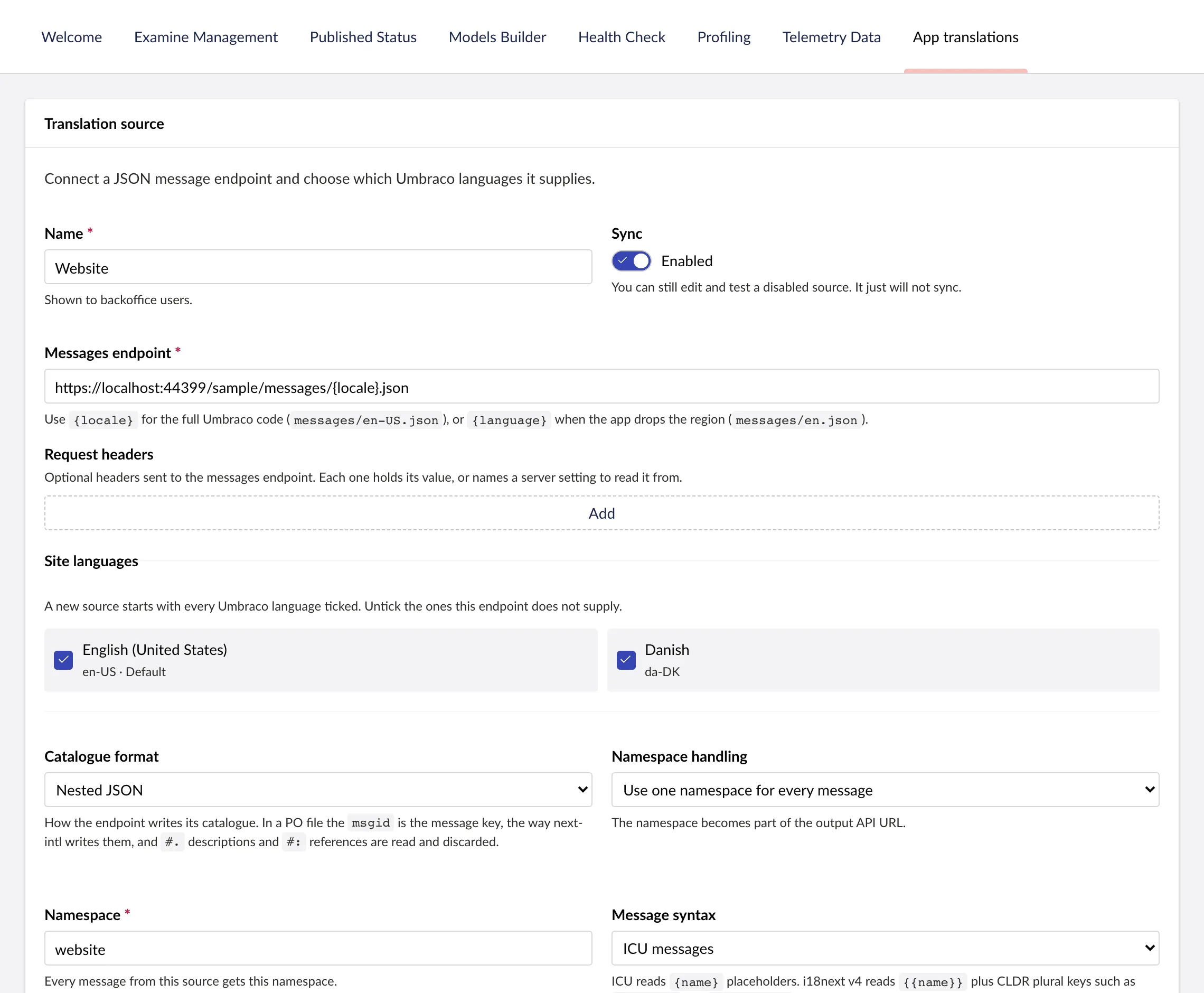
- Sync automatically. Sync the source every hour, every 6 or 12 hours, every day or every week, counted from its last sync. Off by default. See Syncing on a schedule.
- Message syntax. ICU messages, as next-intl and FormatJS use them, i18next JSON v4, or plain text. The editor checks every change against the syntax, so an edit cannot break a placeholder or a plural.
- Namespace handling. Use the first key of the JSON as the namespace, or put every message in one namespace you name. See Namespaces.
- Advanced. The source identifier for deployment-triggered sync, a request timeout (10 seconds by default), and the largest response the source accepts (10 MB by default).
Test source fetches the files with the current settings without saving anything. Sync now reads them in.
Namespaces
A namespace is a group of messages your application can fetch on its own. The delivery endpoints serve one namespace per request, several, or every namespace at once. Every message belongs to exactly one, and Umbraco shows keys as namespace.key.
Take a file with two top-level keys:
{
  "navigation": { "home": "Home" },
  "checkout": { "pay": "Pay now" }
}| Namespace handling | Namespaces | Keys |
|---|---|---|
One namespace for every message, named website |
website |
navigation.home, checkout.pay |
| First key of the JSON | navigation and checkout |
home, pay |
With one namespace for every message, the name you give it is only the name your application fetches the messages by. It is not a key in your file, and a request for that namespace returns the file’s keys without it.
Use one namespace when your application loads the whole file at once, as a next-intl application with a single messages/{locale}.json does. Use the first key when the top-level keys are separate bundles your application loads on their own, such as i18next namespaces.
The response for a namespace leaves the namespace out. Asking for website returns {"navigation": {"home": ...}, "checkout": {...}}, the same shape as the file. Asking for navigation returns {"home": ...}, so put it back under navigation before merging, or leave the namespace out of the request: every namespace then comes back under its own name, which for the first-key source is the same shape as the file. See one namespace, several, or all of them.
Two sources can share a namespace, as long as they do not supply the same key.
Sources that need authentication
You can add request headers to a source. Each header either holds its value, or names a configuration setting that supplies the value when Umbraco makes the request.
This example gives a header X-Api-Key the setting name Translations:SourceApiKey:
{
  "Translations": {
    "SourceApiKey": "development-value-only"
  }
}
In a deployed environment, supply the value as the environment variable Translations__SourceApiKey or through your secret store. For a bearer token, add an Authorization header and make the setting’s value the whole header, for example Bearer your-token.
Sources on a private network
By default, sources connect only to public addresses, do not follow redirects and do not use the host’s proxy. That stops anyone from using a source URL to reach internal services.
To read from a private network or localhost, turn on AppTranslations:SourceSecurity:AllowPrivateNetworkEndpoints.